

Skills
Give your agents reusable playbooks for situations like pricing questions, and turn them on per agent.
Skills give your agents the judgment of your best salesperson in the situations that decide a deal. You write the playbook once, and every agent it's turned on for applies it in every conversation.
This article covers writing and editing skills in the library. It also covers turning a skill on for an agent.
What is a skill?
A skill is a short playbook, written in plain English, that tells your agents how to handle a kind of situation. For example, a skill can describe how to respond when a visitor pushes back on price. An agent applies every skill that is turned on for it, in every conversation.
ShowPilot comes with built-in skills. You can edit them, remove them, or write your own.
What do you need before you start?
- An agent to turn the skill on for. See Create an agent.
How do you add a skill?
Open the skill library
Go to Agents and select the Skills tab. Each skill shows its description and the agents that use it under Used by. It also shows how often it was used in the last 7 days. Select View skill body to read a skill in full.
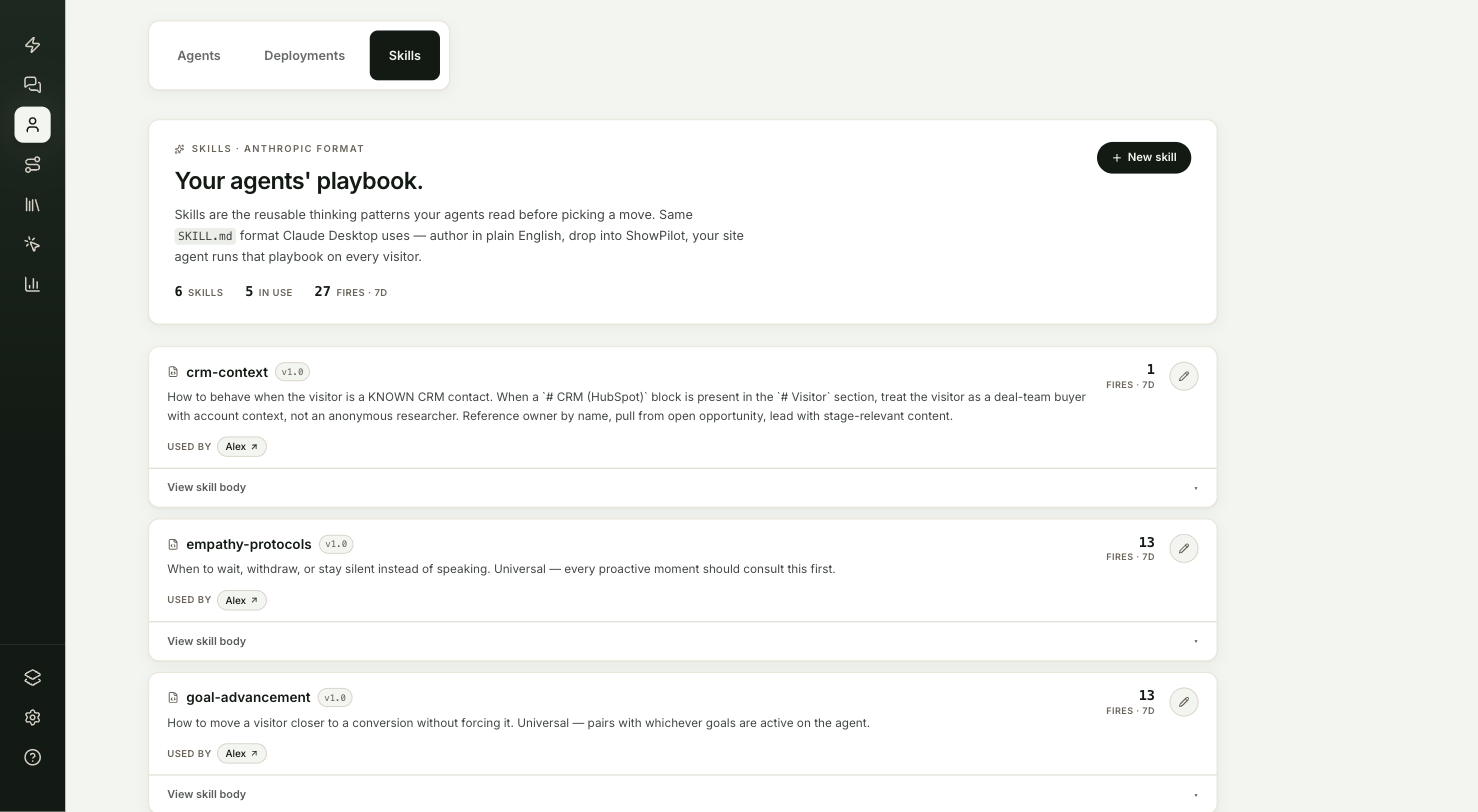
Write a new skill
Select New skill. Fill in:
- Name, such as "Pricing objections".
- Description, one line on what the skill is for.
- Skill body, the playbook itself. Write it the way you would brief a new salesperson. Lists and headings work.
Select Save skill.
Or edit a built-in skill
Select the pencil icon on a built-in skill. Change what you need and select Save edited copy. Your copy replaces the built-in one for every agent that uses it, and shows edited in the library.
To go back to the original, open the skill and select Revert to built-in.
Turn it on for an agent
Open the agent's Persona tab and find the Skills card. Select a skill to turn it on; a check mark shows it's on. Select it again to turn it off. Then select Publish so visitors get the change.
Test it
A skill is working when the agent follows it in a real conversation:
- Select Preview on your site at the top of the agent editor.
- Start a conversation that should trigger the skill, such as a question about price.
- The agent follows the playbook. The fires · 7d count on the Skills tab shows how often agents used each skill.
What should you know before changing a skill?
| Action | What happens |
|---|---|
| Editing a skill | It changes for every agent that uses it. Check Used by before you save. |
| Remove from library on a built-in skill | Hides it from the library and from every agent. Restore it from Removed built-ins at the bottom of the Skills tab. |
| Delete skill on a skill you wrote | Stops every agent from using it. |
Skills marked internal are used by ShowPilot itself and aren't offered to your site agents.
Troubleshooting
| Issue | What to check |
|---|---|
| The agent doesn't follow the skill | Check that the skill has a check mark in the agent's Skills card, and that you published afterward. |
| A built-in skill is missing | It may have been removed. Restore it from Removed built-ins at the bottom of the Skills tab. |
| A skill isn't offered for your agent | Skills marked internal aren't offered to site agents. |
Frequently asked questions
Does editing a skill change it for every agent?
Yes. Check Used by before you save.
Can I get a built-in skill back after editing it?
Yes. Open the skill and select Revert to built-in.
Do skill changes need a publish?
Turning a skill on or off for an agent does. Select Publish after you change the Skills card.