

Guide conversations with scripts
Give your agent the steps to follow, the goals to work toward and the limits it must never cross.
A script is how you run your sales motion through the agent. It sets the path a conversation should take and the outcome the agent works toward, along with the lines it must never cross.
This article covers writing a script and making it active. It ends with checking that the agent follows it.
What is a script?
A script has three parts:
| Part | What it does |
|---|---|
| Conversation | The steps the agent follows. |
| Goals | The outcomes the agent invites visitors toward. |
| Guardrails | The rules the agent must never break. |
An agent can have several scripts, but only one is active at a time.
What do you need before you start?
- An agent with some knowledge added. A script tells the agent what to do, and knowledge gives it the facts. See Add knowledge.
How do you write a script?
Start a script
Open the agent and select the Scripts tab. In the left rail, select New, then pick one:
- Blank script starts empty.
- From smart template offers ready-made scripts. Pick one and select Generate script. ShowPilot reads your knowledge and content, then fills in the steps, goals and guardrails. This takes about half a minute.
The smart template window has Rewrite agent instructions checked by default. That replaces the text in the Persona tab's System prompt with a generated draft. Uncheck it to keep your own.
To rename a script, double-click its name.
Add conversation steps
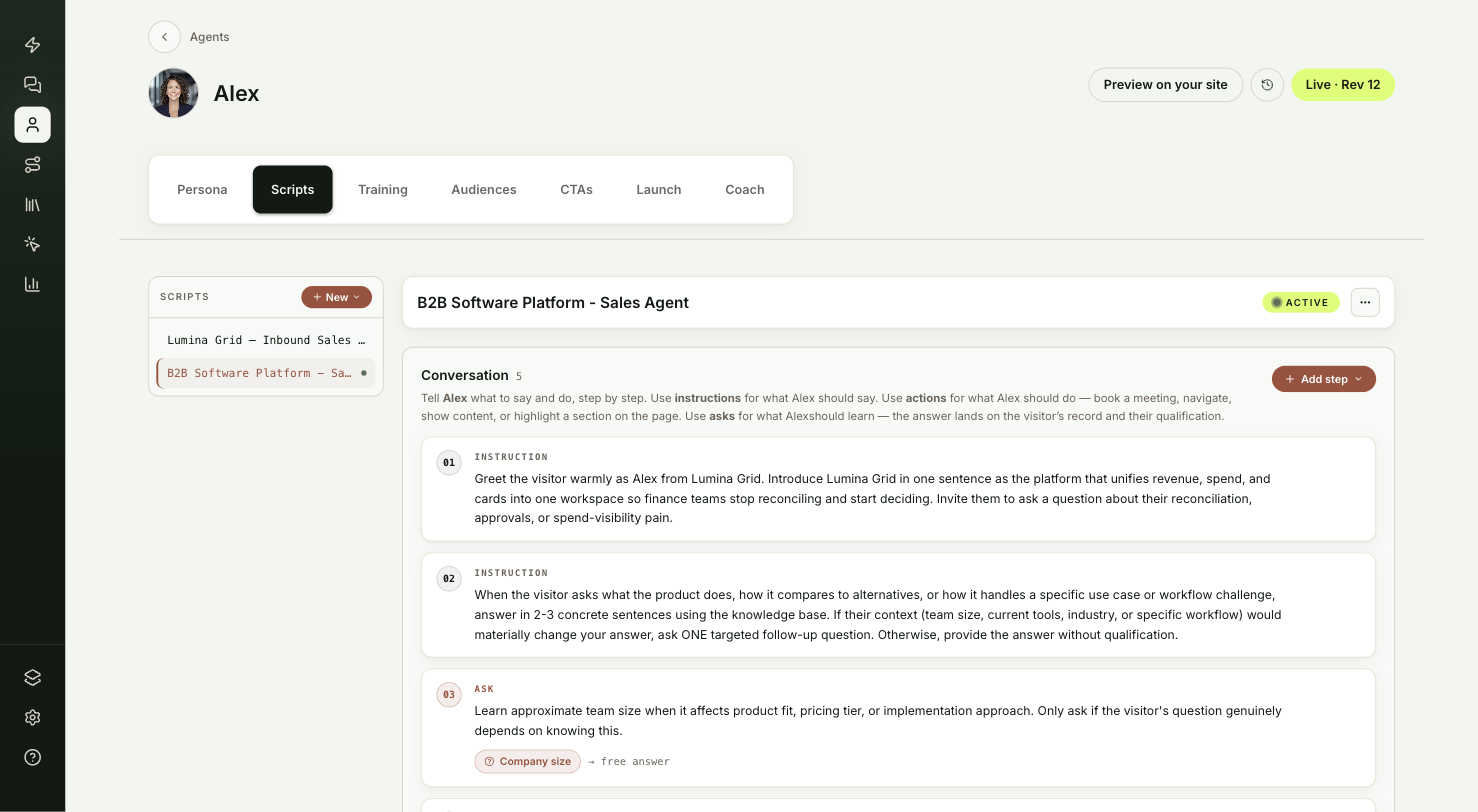
Under Conversation, select Add step and pick a type:
- Instruction is a free-form note on what the agent should say at this step.
- Action is something the agent should do, such as Book meeting, Navigate, Recommend content, Open content, Open experience or Highlight on page. You write when the agent should take it.
- Ask is something the agent should learn. Write the question and pick the field the answer is saved to on the visitor's record.
Set goals
Under Goals, select Add goal and name the outcome, such as "Book a meeting". In the goal's card, write what the agent says when it makes the offer, and set Offer when conditions so the agent waits until the visitor is ready. Max offers per session and Cool-down (turns) stop it from repeating the offer too often.
Add guardrails
Under Guardrails, select Add rule and finish the sentence that starts with Never. For example: never quote pricing. The agent keeps to these rules even when a visitor asks.
Make it active
Select Set active at the top of the script and confirm. The active script has a dot next to its name in the rail. To stop using it, open the more menu and select Deactivate.
Script changes, including which script is active, are part of the agent's draft. Select Publish when you're ready for visitors to get them.
Test it
Your script is ready when a preview conversation behaves the way you wrote it:
- Select Preview on your site at the top of the editor. Your site opens with the draft agent, while visitors keep the published one.
- Start a conversation. The agent follows your steps and waits for the right moment to make its offer.
- Ask it something one of your guardrails forbids. It declines.
Troubleshooting
| Issue | What to check |
|---|---|
| The agent ignores the script | Check that the script shows Active, and that you published after activating it. |
| The agent makes its offer too early | Add Offer when conditions to the goal, or raise Cool-down (turns). |
| The agent repeats its offer | Lower Max offers per session, or raise Cool-down (turns). |
| Your own system prompt was replaced | Rewrite agent instructions was checked when you generated from a smart template. Uncheck it next time to keep your own text. |
Frequently asked questions
Can an agent have more than one script?
Yes, but only one is active at a time. The active script has a dot next to its name in the rail.
Do script changes need a publish?
Yes. Script changes, including which script is active, are part of the agent's draft.
Where do answers to an Ask step go?
To the field you pick on the visitor's record.