

How knowledge works
What your agent answers from, the difference between an agent's own Training and shared datasets, and how fast changes reach visitors.
Knowledge decides whether a buyer gets a correct answer or a vague one. Your agent answers product questions from the sources you give it. Good sources mean fewer wrong answers and fewer questions handed back to your team. More of your conversations end in a meeting.
This article explains what knowledge is, where it lives, and how your agent uses it in a conversation.
What is knowledge?
Knowledge is the set of sources an agent reads before it answers. There are three kinds:
| Source | What it is | Good for |
|---|---|---|
| URLs | Pages from your website. Add one page, or a whole site with its sub-pages. | Product and pricing pages, and your support articles. |
| Snippets | Short facts you type in. | Policies and support hours. Any claim the agent must always get right. |
| Documents | PDFs. | Data sheets and security overviews. |
You're in the right place when you want your agent to answer from your own material instead of general knowledge.
Where do you find knowledge?
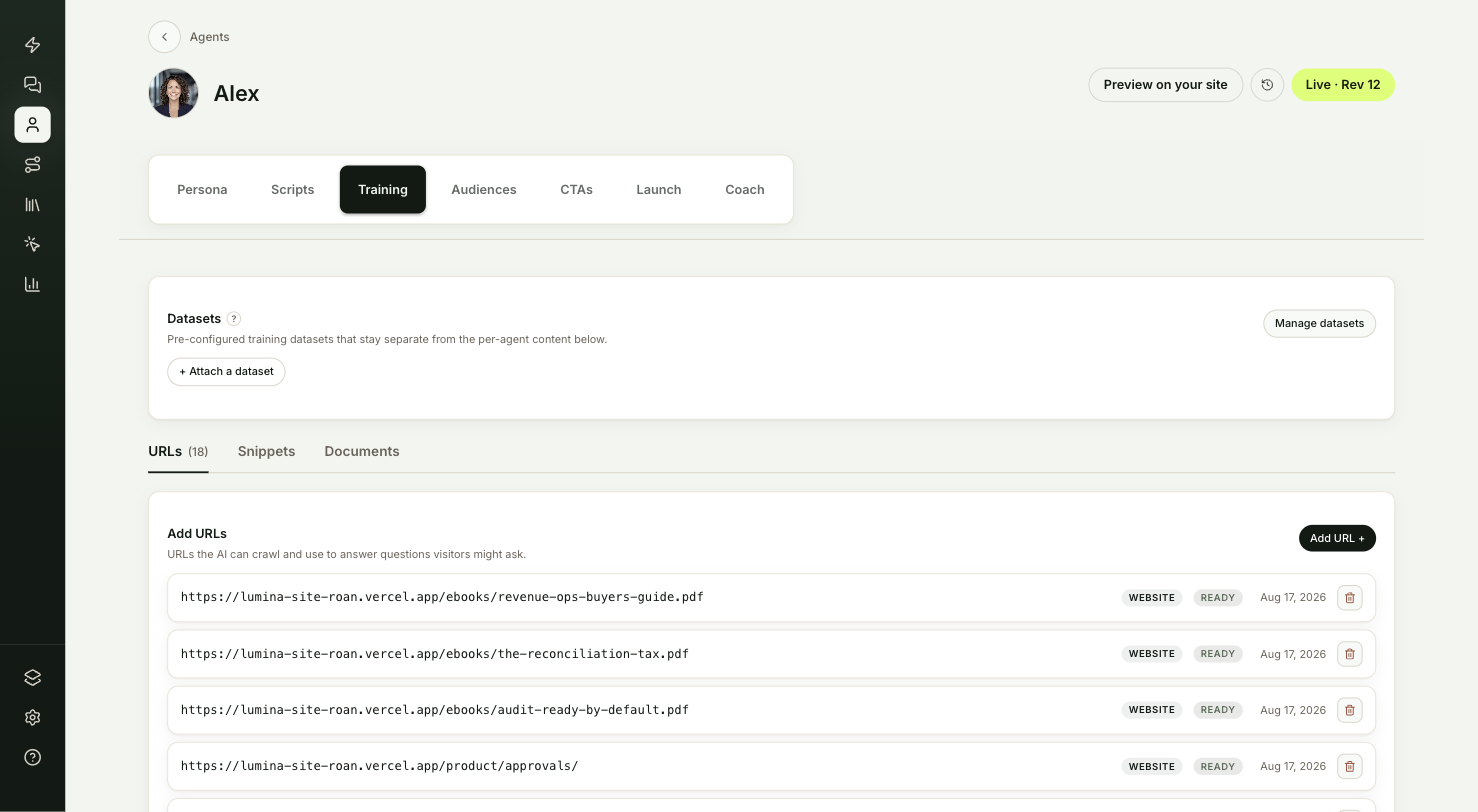
Knowledge lives in two places. Both hold the same three kinds of source.
| Place | What it holds | Use it when |
|---|---|---|
| The agent's Training tab | Sources for that one agent. | The content only matters to this agent. |
| Knowledge in the sidebar | Shared datasets. The page is titled Training datasets. | Several agents should answer from the same content. |
A dataset is a named bundle of sources. You attach it to any number of agents from each agent's Training tab, in the Datasets card. Update the dataset once and every agent it's attached to answers from the new version.
How does your agent answer from knowledge?
When a visitor asks a question, the agent searches its own Training sources and every attached dataset for the passages closest to the question. It answers from what it finds.
- Weak matches are left out. A passage that is only loosely related doesn't make it into the answer, so the agent doesn't stretch unrelated content to fit.
- Small talk skips the search. Greetings and very short replies are answered without looking anything up.
- Unanswered questions reach your team. When the agent can't answer, it tells the visitor your team will follow up, and the question lands in Inbound → Follow-ups. See Answer follow-ups.
To see which sources an answer used, ask the question on the agent's Coach tab and expand the answer.
What can't the agent read?
- Pages behind a login. The agent only reads pages that anyone can open without signing in. Help centers or portals that need an account show Failed.
- Files other than PDFs on the Training tab. Documents accepts PDFs. Videos and images belong in Content, where the agent can show them to visitors. See How content works.
How fast do changes reach visitors?
Knowledge changes apply as soon as a source shows Ready. You don't need to publish the agent again. Agent settings such as the persona and scripts are different. Those reach visitors only after you publish.
| Status | What it means |
|---|---|
| Queued | Waiting to be read. |
| Indexing | Being read now. |
| Ready | Live in answers. |
| Failed | Couldn't be read. Open the page in a private window to see why. |
| Archived | Pulled out of answers but kept, so you can restore it. |
After you add a site, ShowPilot keeps re-checking its pages. See Keep knowledge current.
Troubleshooting
| Issue | What to check |
|---|---|
| The agent answers without using a page you added | Check the page shows Ready. Then ask the question on Coach and expand the answer to see which sources it used. |
| A dataset's content never shows up in answers | Check the dataset is attached in the Datasets card on that agent's Training tab. |
| A page shows Failed | Open the address in a private browser window. If it asks for a login or shows an error, the agent can't read it either. |
| The agent gives an answer that is out of date | See Keep knowledge current. |
Frequently asked questions
Should I use the Training tab or a shared dataset?
Use a shared dataset for anything more than one agent needs, such as your main website. Use the Training tab for content that only one agent should know.
Can one agent use several datasets?
Yes. Attach as many as you like from the Datasets card. The agent searches its own sources and every attached dataset together.
Do I need to publish after changing knowledge?
No. Changes apply as soon as a source shows Ready.
Does the agent make things up when it has no source?
The agent answers from the passages it finds. When nothing fits, it hands the question to your team through Inbound → Follow-ups instead of guessing.