

Answer follow-ups
Answer the questions your agent couldn't, email the answer from your own mailbox, and close the loop in one place.
A buyer's unanswered question is a stalled deal. When a visitor asks something your agent can't answer, the agent tells them your team will follow up and adds the question to Inbound → Follow-ups. You write the answer once. ShowPilot emails it to the visitor from a rep's own mailbox and closes the question.
This article covers how to answer a question and which mailbox the answer goes from. It ends with how to confirm the answer went out.
What do you need before you start?
- A connected mailbox, so the answer can go out by email. The mailbox is the account a rep connects with Connect calendar on Inbound → Routing. See Connect your email and calendar.
How do you answer a follow-up?
Open the queue
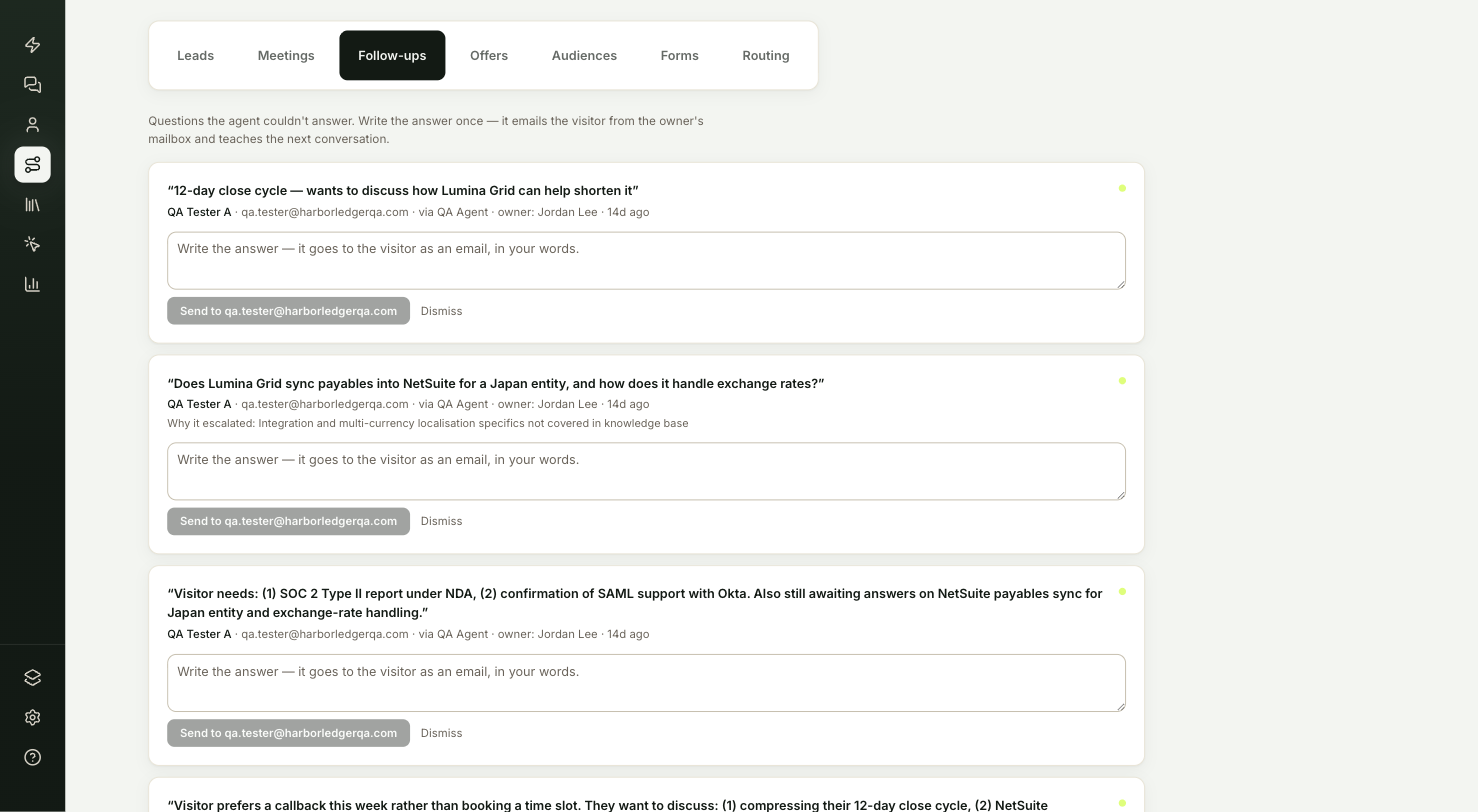
Go to Inbound → Follow-ups. Open questions are at the top. Each card shows the question in the visitor's words, who asked it, which agent they spoke to, the lead's owner and how long ago they asked. Why it escalated explains why the agent passed it on.
Check who asked
Select the visitor's name to open their lead brief if you need more context before you answer.
Write the answer and send it
Type your answer in the box, in your own words. The button shows where it goes:
- Send to followed by the visitor's email address sends it as an email.
- Save answer appears when there's no email on file. The answer is saved for when the visitor comes back.
After you send, the card confirms what happened, then the question moves to Closed.
If a question doesn't need an answer, select Dismiss. It moves to Closed marked Dismissed.
Which mailbox does the answer come from?
ShowPilot never emails a visitor from a ShowPilot address. It sends from:
- The mailbox of the rep who owns the question, if they've connected one.
- Otherwise, your own mailbox, if you've connected one.
If neither is connected, the answer is saved and the question closes, but no email goes out. The card tells you so, and you can reach the visitor another way.
Test it
Confirm the answer reached the visitor:
- Look under Closed for the question you answered.
- The line under your answer reads Answered by your name, then emailed and the visitor's address. not emailed means no mailbox was connected or there was no email on file.
Troubleshooting
| Issue | What to check |
|---|---|
| The answer shows not emailed | Neither the owning rep nor you has a connected mailbox, or there was no email on file. |
| The button says Save answer instead of Send to | There's no email on file for the visitor. The answer is saved for when they come back. |
| You need more context before answering | Select the visitor's name to open their lead brief. |
Frequently asked questions
Does the visitor get an email from ShowPilot?
No. The answer goes from the owning rep's own mailbox, or yours if they haven't connected one. With no mailbox connected, no email goes out.
What happens to a question I dismiss?
It moves to Closed, marked Dismissed, and no answer is sent.
Where do I connect a mailbox?
A rep connects it with Connect calendar on Inbound → Routing. The same connection serves as the calendar and the mailbox.