

Fields and qualification
The list of details your agent can collect, how each maps to your CRM, and the framework it listens for while it talks.
Fields are the qualification data your agent gathers from every buyer. Each one is defined once, so the same answers feed your forms and routing rules and reach your CRM. Inbound → Forms → Fields lists every detail your agent can collect, such as work email, company size or industry. Each field is defined once and reused by every form, and mapped once to your CRM.
This article covers how to read and add fields. It also covers choosing the qualification framework the agent listens for.
Where do you find fields?
Go to Inbound → Forms → Fields. Adding a field here doesn't put it on a form. Forms pick from this list.
You're in the right place when you want to add a detail the agent can collect, or send its answers to a CRM property.
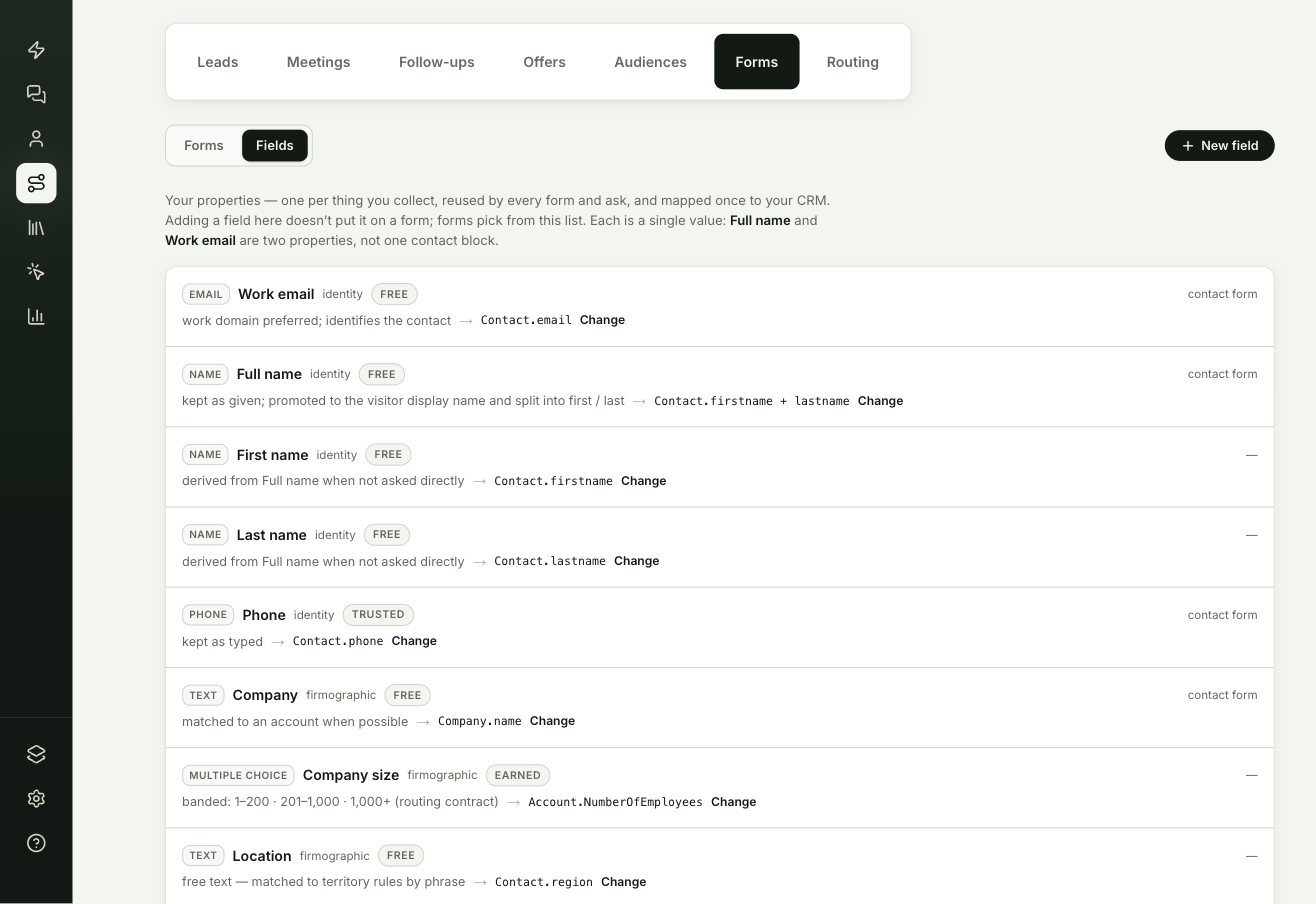
What does each field row show?
| Part | What it means |
|---|---|
| Type | The kind of answer, such as Email, Number, Multiple choice or Yes / no. |
| Name and category | The field's label and the group it belongs to, such as identity or qualification. |
| Usage | Where it's used: routing rules, forms, your scorecard framework or the contact form. A dash means nothing uses it yet. |
| CRM mapping | The CRM property its answers go to, or unmapped. |
An unmapped field's answers still reach the lead and the transcript, but never your CRM. Select Map it to set the CRM property.
How do you add a field?
Select New field, type a name, choose the type and category, and select Create field. ShowPilot shows the key it will save the answers under. Each field holds a single value, so full name and work email are two fields, not one contact block.
Built-in fields keep their key and type. You can change their label and CRM mapping.
How do you choose the qualification framework?
Below the list, a line shows which framework the agent is listening for: BANT, MEDDIC or MEDDPICC. The agent doesn't quiz visitors on these. It picks up the answers from what they say, and the results fill the scorecard on the lead brief, the visitor's profile and the note on your CRM contact.
To switch, select Change and pick a framework. When you switch, scorecard entries outside the new framework are dropped on the next update. Existing conversations keep working.
Frequently asked questions
Why aren't a field's answers reaching my CRM?
The field is unmapped. Its answers still reach the lead and the transcript. Select Map it to set the CRM property.
Does the agent quiz visitors on BANT or MEDDIC?
No. It picks up the answers from what visitors say, and the results fill the scorecard on the lead brief.
Can I change a built-in field?
You can change its label and CRM mapping. Its key and type stay the same.
What happens to scorecards when I switch frameworks?
Scorecard entries outside the new framework are dropped on the next update. Existing conversations keep working.