

Leads
Everyone your agent captured or booked, with their tier, owner and the offer that started it, ready to filter or export.
Inbound → Leads is the list of buyers your agent brought in: every person it captured, either by collecting their details or by booking them a meeting. Use it to see this week's leads, find the hot ones that haven't reached your CRM, and export a list. Pipeline work stays in your CRM.
This article covers how to read and filter the list. It also covers exporting it and opening a lead.
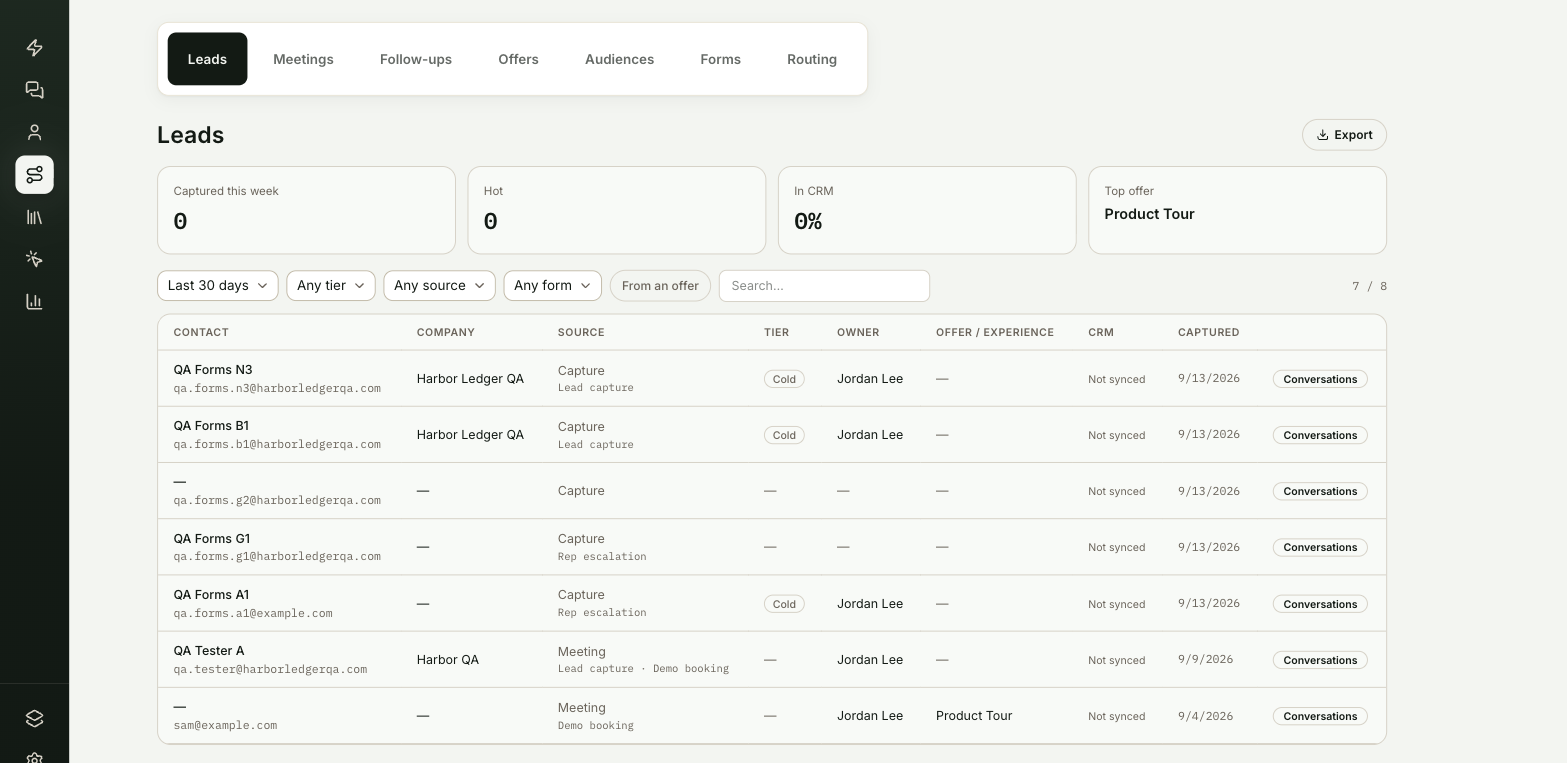
Where do you find your leads?
Go to Inbound → Leads. It's the first tab Inbound opens on.
You're in the right place when you want to know who the agent captured, how warm they are and whether they reached your CRM.
Why is each person on one row?
A buyer can show up more than once, for example from two browsers, or once when they left an email and again when they booked. ShowPilot merges rows that share an email address into one person. The newest details win, and the source shows Meeting if any of their visits booked one. Rows without an email stay separate.
What do the summary cards show?
| Card | What it shows |
|---|---|
| Captured this week | People captured in the last seven days. |
| Hot | Hot-tier leads in the current filter. |
| In CRM | The share of leads in the current filter that reached your CRM. |
| Top offer | The offer behind the most leads in the current filter. |
What does each column mean?
| Column | What it shows |
|---|---|
| Contact | Name and email. |
| Company | Their company, when known. |
| Source | Capture if they left their details, Meeting if they booked. The forms they filled in show underneath. |
| Tier | Hot, Warm or Cold, from the agent's read of fit and intent. |
| Owner | The rep your routing rules assigned. |
| Offer / Experience | The offer they accepted before they converted, and any experiences they opened. Blank means they came in without an offer. |
| CRM | The CRM they were synced to, or Not synced. |
| Captured | The date of the capture. |
How do you filter and search leads?
Use the filter row above the table:
- A date range: Last 7 days, Last 30 days (the default), Last 90 days or All time.
- Any tier, Any source and, once a form has produced a lead, Any form.
- From an offer shows only leads that accepted an offer first.
- Search matches name, email, company, offer, experience and form.
The count at the right shows how many rows match out of the total.
How do you export a list?
Select Export to download the rows that match your current filters as a CSV file. The file includes these columns:
- name, email and company
- source and form
- tier, offer and experiences
- CRM status and capture date
How do you open a lead?
- Select a row to open the person's lead brief.
- Select Conversations at the end of the row to read their conversations.
Frequently asked questions
Why did two leads merge into one?
They share an email address. ShowPilot treats them as one person and keeps the newest details.
Why do some leads show Not synced?
The CRM column shows Not synced when the lead hasn't reached your CRM. The In CRM card shows the share that did.
Does the export include every lead?
It includes the rows that match your current filters. Set the date range to All time and clear the other filters to export everyone.
Why is the Offer / Experience column blank?
The person came in without accepting an offer first.