

The lead brief
One page with everything the agent learned about a person, built to read before a meeting and printable as a PDF.
The lead brief puts a rep into a meeting already knowing the buyer. It gathers what your agent learned about one person across all their visits: how well they fit, what they told the agent, what they read on your site and what's still unknown.
This article covers where to open a brief and what's on it. It also covers printing it for the rep who takes the call.
Where do you open a lead brief?
- From Inbound → Leads, select the person's row.
- From Inbound → Meetings, select Brief on the meeting's row.
- From Inbound → Follow-ups, select the visitor's name on a question.
You're in the right place when you're about to talk to a buyer and want their fit, answers and open questions on one page.
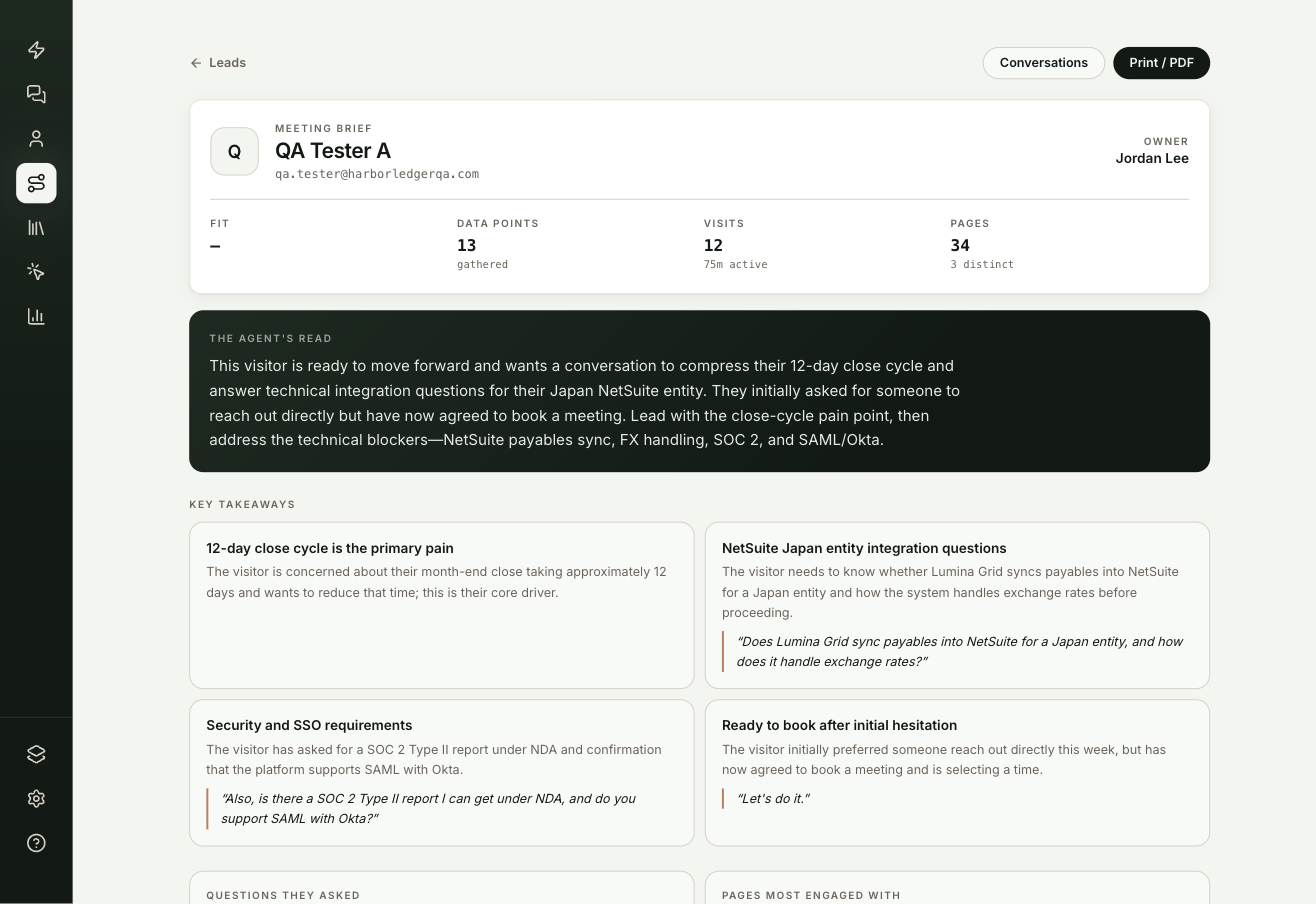
What is on the brief?
| Section | What it shows |
|---|---|
| Header | Name, company, email and the lead's owner. Below it: Fit (Book-ready, Engage or Outside ICP, with the tier), Data points gathered, Visits with active time, and Pages viewed. |
| The agent's read | A short summary of who this person is and where they stand. |
| Scorecard | One card per field in your qualification framework, such as BANT. Each answer is tagged they said, CRM or inferred, with how long ago it arrived. |
| Key takeaways | The main points from their conversations, with a quote where one supports it. |
| Questions they asked | Their questions, in their words. |
| Stated | Other answers they gave, such as location or industry. |
| Ownership | Why routing assigned the owner it did. |
| Pages most engaged with | The pages they viewed most, with a view count for each. |
| Meetings | Meetings they booked, and any that were cancelled. |
| The conversations | A dated summary of each conversation, with any open thread. |
How do you read the scorecard?
An answer the person gave outranks one from your CRM, and both outrank one the agent inferred. A stated answer is never replaced by a guess.
A field without an answer shows one of two states:
- still asking: the agent is working the question into conversation, because one of the agent's scripts asks for it or a routing rule needs it.
- still open: nothing is pursuing it. The card suggests asking in the meeting.
To change which framework the scorecard uses, see Fields.
How do you print or save the brief as a PDF?
Select Print / PDF. The brief prints without the app's sidebar and header. Choose Save as PDF in your browser's print dialog to keep a file.
Frequently asked questions
What does "inferred" mean on the scorecard?
The agent worked the answer out from the conversation rather than hearing it directly. An answer the person stated, or one from your CRM, always outranks it.
What is the difference between still asking and still open?
still asking means the agent is working the question into conversation. still open means nothing is pursuing it, so it's worth asking in the meeting.
Can I use a framework other than BANT?
Yes. The scorecard follows the framework set on Fields: BANT, MEDDIC or MEDDPICC.