

Meetings
Every meeting your agent booked, and a checklist showing what happens on your side when one books.
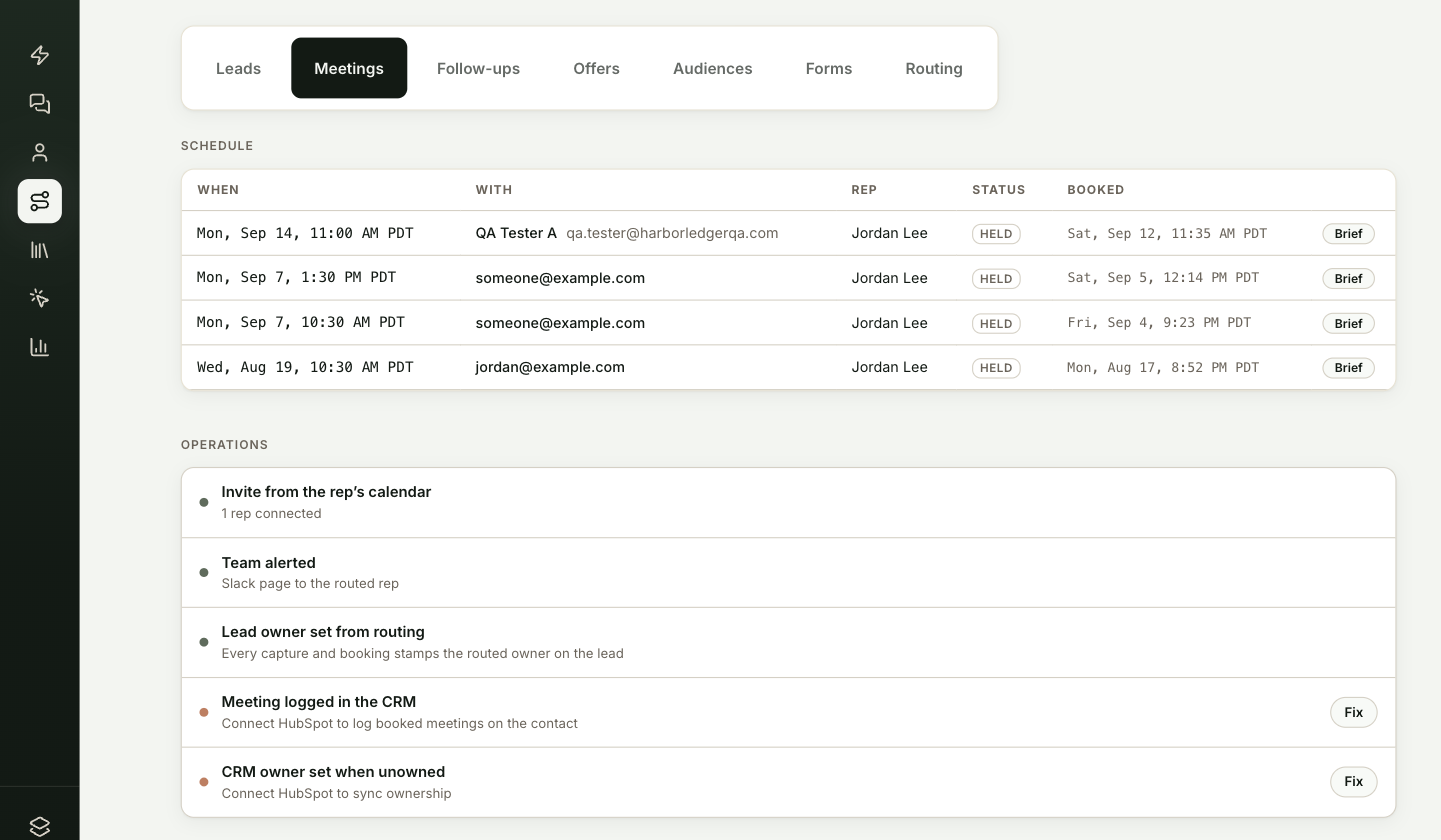
Inbound → Meetings is where the agent's booked pipeline lands. It has two parts: the Schedule of meetings your agent booked, and Operations, a checklist of what ShowPilot does when a meeting books and what's missing.
This article covers how to read both. To let the agent book meetings in the first place, see Set up meeting booking.
Where do you find booked meetings?
Go to Inbound → Meetings.
You're in the right place when you want to see who booked with which rep, or check that every booking reaches the right people and systems.
What does the Schedule show?
| Column | What it shows |
|---|---|
| When | The meeting's start time. |
| With | The visitor's name and email. |
| Rep | The rep the meeting is with. |
| Status | Upcoming, Held once the start time has passed, or Cancelled. |
| Booked | When the visitor booked. |
| Brief | Opens the visitor's lead brief. |
How do you check meeting operations are working?
Each row of Operations says whether it's working and, if not, what's missing. Rows that need attention have a Fix button that takes you to the right setting.
| Row | Working when |
|---|---|
| Invite from the rep's calendar | At least one active rep has connected a calendar. Without one, invites fall back to the booking link. |
| Team alerted | Slack is connected, or you've added alert email addresses on Inbound → Routing → Activity. Otherwise nobody is notified. |
| Lead owner set from routing | Always on. Every capture and booking records the routed owner on the lead. |
| Meeting logged in the CRM | HubSpot is connected. The meeting goes on the contact's timeline with the brief included. |
| CRM owner set when unowned | HubSpot is connected with permission to read owners. The routed rep becomes the contact owner if nobody owns the contact yet. |
Troubleshooting
| Issue | What to check |
|---|---|
| Invites come from the booking link instead of a rep's calendar | No active rep has connected a calendar. See Your team and calendars. |
| Nobody on the team hears about new meetings | Connect Slack, or add alert email addresses on Inbound → Routing → Activity. |
| Meetings don't appear in your CRM | Meeting logged in the CRM needs HubSpot connected. |
| The last row says to reconnect HubSpot | Reconnect HubSpot so ShowPilot can read your HubSpot owners. |
Frequently asked questions
When does a meeting show as Held?
Once its start time has passed.
Does ShowPilot change the owner of a contact in HubSpot?
Only when nobody owns the contact yet. The routed rep then becomes the contact owner, as long as HubSpot is connected with permission to read owners.
Does the meeting brief reach the CRM?
Yes, with HubSpot connected. The meeting goes on the contact's timeline with the brief included.