

Share content with an experience
Turn a content item or playlist into a link your agent guides visitors through, then share it or embed it on a page.
An experience takes your agent beyond your website. It pairs your content with an agent behind one link, so a prospect who opens it from an email or a post gets the material with the agent beside it, ready to walk them through it and answer questions.
This article covers building an experience and choosing who can see it. It ends with sharing the link.
What is an experience?
An experience pairs your content with an agent and gives you one link to share. A visitor who opens the link sees the content with the agent beside it. You can send the link in an email, post it, or embed the experience on a page.
You're in the right place when you want to send a specific piece of content to prospects and have the agent guide them through it.
What do you need before you start?
- Content in your library, or a playlist. See Content library.
- An agent to guide it. See Create an agent.
How do you create an experience?
Start it
Go to Content, open the Experiences tab and select New experience. Type a name at the top where it says Name this experience. Changes save as you go.
Pick what you're sharing
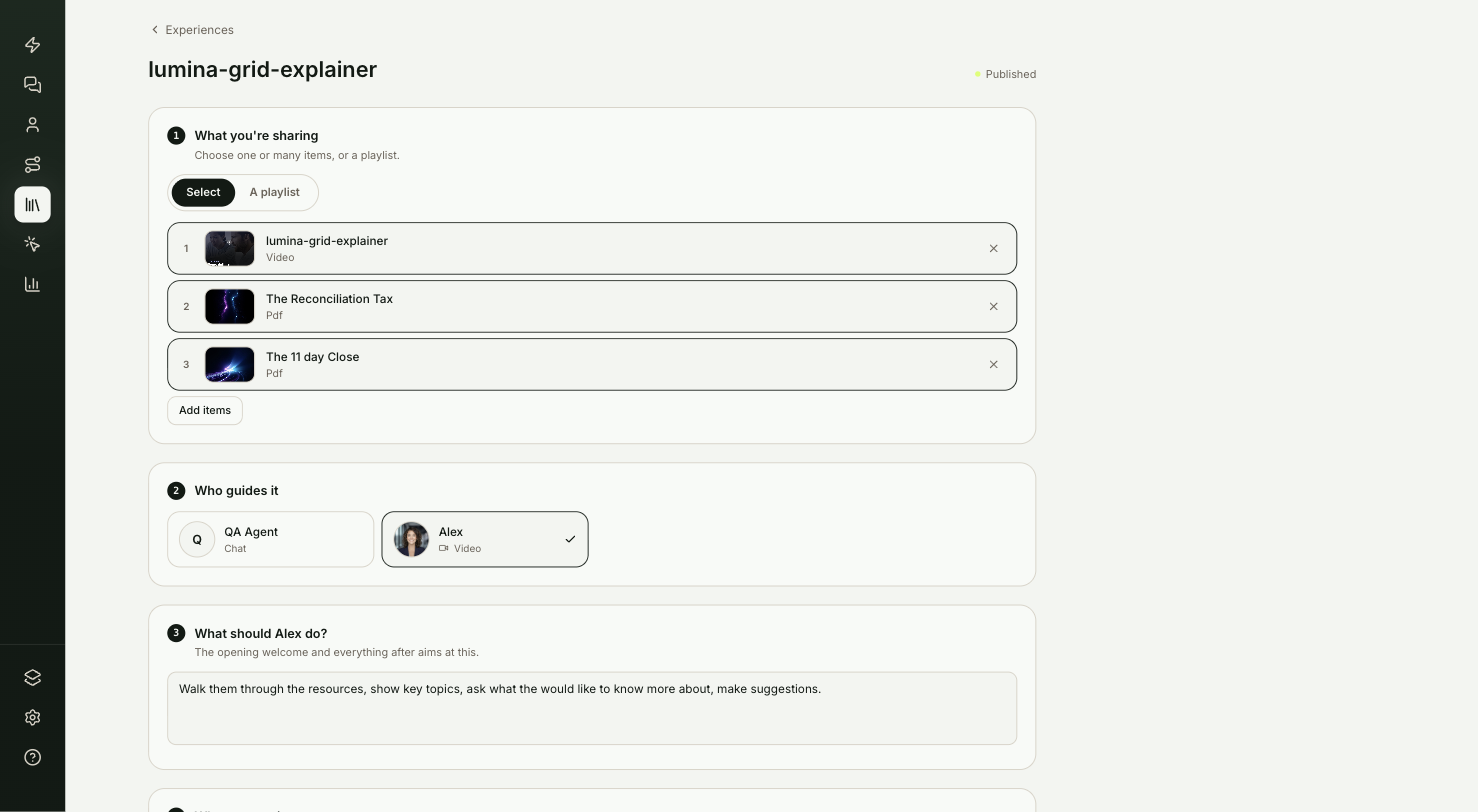
Under What you're sharing, choose Select to pick one or more items from your library, or A playlist to share a whole playlist.
Pick who guides it
Under Who guides it, select the agent. Each card shows whether that agent uses chat, voice or video.
Set the goal
In the third section, describe what the agent should do with each visitor. For example: walk them through the case study and answer questions, then offer a meeting when they're ready. The agent's welcome and everything after aims at this goal.
Choose who can see it
Under Who can see it, pick one:
| Option | What visitors get |
|---|---|
| Open to everyone | No form. The link just works. |
| Lead form first | Visitors introduce themselves before anything shows. |
| Preview, then form | Visitors see a set number of items free, then fill in the form for the rest. Set the number in Free items before the form. |
For the two form options, choose which details The form asks for.
Feature it on your site (optional)
Under Feature it, select Feature this experience so your site agent can offer it to visitors when the moment fits. Describe when in Offer it when…. Only experiences that are open to everyone can be featured.
Publish and share
Select Publish & get the link. The share section below lights up:
- Copy link copies the link. Add Campaign tracking tags if you want visits from this link tagged in your analytics.
- On your page gives you code to paste into a web page. Pick Full experience to run it in the page, Button to open it in a pop-up, or Preview card for a thumbnail with a button.
- ShowPilot also writes a Social post and an Email for you. Select Copy with link, or share it straight to LinkedIn, X or email.
Test it
Your experience is ready to send when:
- The link opens in a private browser window.
- Your content shows with the agent beside it, and the form appears if you chose one.
- Back on the Experiences tab, the experience's Views count goes up. Engaged counts visitors who talked to the agent.
How do you take an experience down?
Open it and select Unpublish, or Archive to move it out of the way.
Troubleshooting
| Issue | What to check |
|---|---|
| The experience has no link | Drafts have no link. The list shows "Draft — publish to get a link" until you publish. |
| Feature this experience isn't available | Only experiences that are open to everyone can be featured. Set Who can see it to Open to everyone. |
| The form doesn't appear | Check that Who can see it is set to Lead form first or Preview, then form. |
Frequently asked questions
Can an experience share a whole playlist?
Yes. Under What you're sharing, choose A playlist.
Can I put an experience on my own web page?
Yes. After you publish, On your page gives you code to paste. Pick Full experience, Button or Preview card.
What does the Engaged count mean?
It counts visitors who talked to the agent. Views counts visitors who opened the link.