

Pulse
The one-screen summary of what your agents produced, and the accounts worth a call today.
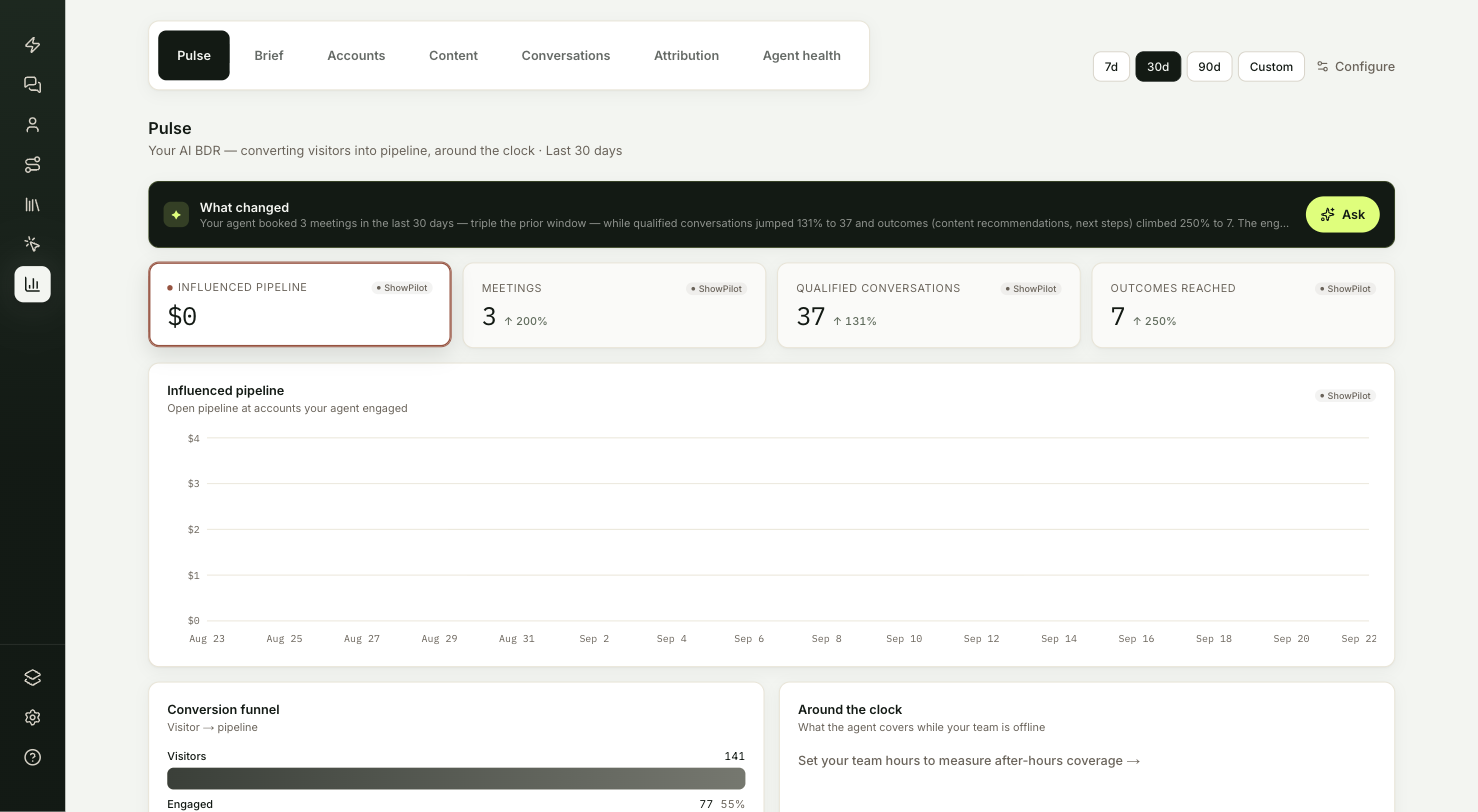
Insights → Pulse tells you whether your agents are producing meetings and pipeline, and which accounts your team should contact today. It's the first tab you see in Insights, and the one to open at the start of a sales day.
This article covers each card on Pulse, how the funnel is counted, and how to act on the Act now list.
What does Pulse show?
| Card | What it tells you |
|---|---|
| What changed | The period in a few sentences, led by your north-star metric. |
| KPI cards | Pipeline and meetings for your date range, with qualified conversations and outcomes. |
| Pacing to goal | How close you are to your monthly or quarterly target. |
| Conversion funnel | Where visitors drop out on the way to a meeting. |
| Around the clock | How much of the agent's work happens while your team is offline. |
| Act now | The accounts most likely to take a call. |
| Where they come from | The countries your visitors' companies are based in. |
You're in the right place when you want one screen that says whether the agent is paying off.
What does the summary band lead with?
The dark band at the top, What changed, summarizes the period in a few sentences. It leads with your north-star metric, which you choose in Settings → Insights. See Configure Insights.
What do the KPI cards count?
Each card shows the total for your date range and the change against the period before. Select a card to redraw the chart below it with that metric's daily trend.
| Card | What it counts |
|---|---|
| Sourced pipeline | Value of deals created on or after the day your agent first engaged the account. Only appears once your CRM deals have synced and at least one deal qualifies. |
| Influenced pipeline | Open deal value at accounts that were active in the range. |
| Meetings | Live calls started from a conversation, plus calendar bookings. |
| Qualified conversations | Conversations with a visitor whose intent score reached 30 or more. |
| Outcomes reached | Meetings plus contact form submissions. |
The metrics glossary has the exact rule for each.
How does Pacing to goal work?
If you set a goal in Settings → Insights, a progress bar appears under the cards. It shows the goal metric's value for the date range you're viewing against your monthly or quarterly target.
A thin marker shows where you should be by today. The line below reads On pace when you're at or ahead of that point, or Behind pace when you're short of it.
How is the conversion funnel counted?
The funnel counts people, not conversations, so each stage is smaller than the one before:
- Visitors: people seen on your site in the range.
- Engaged: visitors who spent active time on a page with the tab in view.
- Conversed: visitors who had at least one conversation with your agent.
- Meetings: visitors who reached a live call or booked a meeting.
A big drop between Engaged and Conversed usually means the agent isn't opening conversations on the pages people read. A big drop after Conversed points at how the agent asks for the meeting.
What does Around the clock show?
This card shows how much of your agent's work happens while your team is offline. It needs your team's working hours, set in Settings → Insights. Until you set them, the card shows a link to do so.
Once hours are set, you see:
- A bar chart of conversations by hour of day, with after-hours bars in a darker color.
- of conversations after hours: the share of conversations that started outside your team's hours or on a day off, in your timezone.
- handled by the agent: the share of conversations that never moved to a live call with your team. The line under it gives the share that did.
How do you act on the Act now list?
Act now lists the six accounts active in the range with the highest visitor intent, with open deal value breaking ties. Each row shows the account's intent score, the open deal value if there is one, and a reason:
- Open opp, with the deal stage when your CRM provides it.
- Crossed into hot intent when a visitor from the account reached an intent score of 60.
- N people engaged when more than one person from the account has visited.
- Recently engaged otherwise.
Start your team's day here. These are the accounts most likely to take a call.
Where do your visitors come from?
Where they come from ranks the countries your visitors' companies are based in by the number of visitors. This fills in as ShowPilot identifies the companies behind visits.
Troubleshooting
| Issue | What to check |
|---|---|
| Sourced pipeline is missing | The card only appears once your CRM deals have synced and at least one deal qualifies. |
| No Pacing to goal bar | Set a goal in Settings → Insights, with Track a target on. |
| Around the clock asks for hours | Set your team's working hours in Settings → Insights. |
| Where they come from is sparse | It fills in as ShowPilot identifies the companies behind visits. |
Frequently asked questions
Why is the funnel smaller at each stage?
It counts people, not conversations. Each stage is a subset of the visitors in the stage before.
What changes when I pick a north-star metric?
The summary band at the top of Pulse leads with that metric.
Does a meeting always mean a booked calendar slot?
No. Meetings counts live calls started from a conversation plus calendar bookings.