

Content
Which assets your agent recommends, which ones visitors open, and which pages start conversations.
Insights → Content shows which of your assets move buyers toward a meeting. Use it to find assets worth promoting and assets to retire. It also points at topics you're missing.
This article covers each card on the tab and how to act on what it shows.
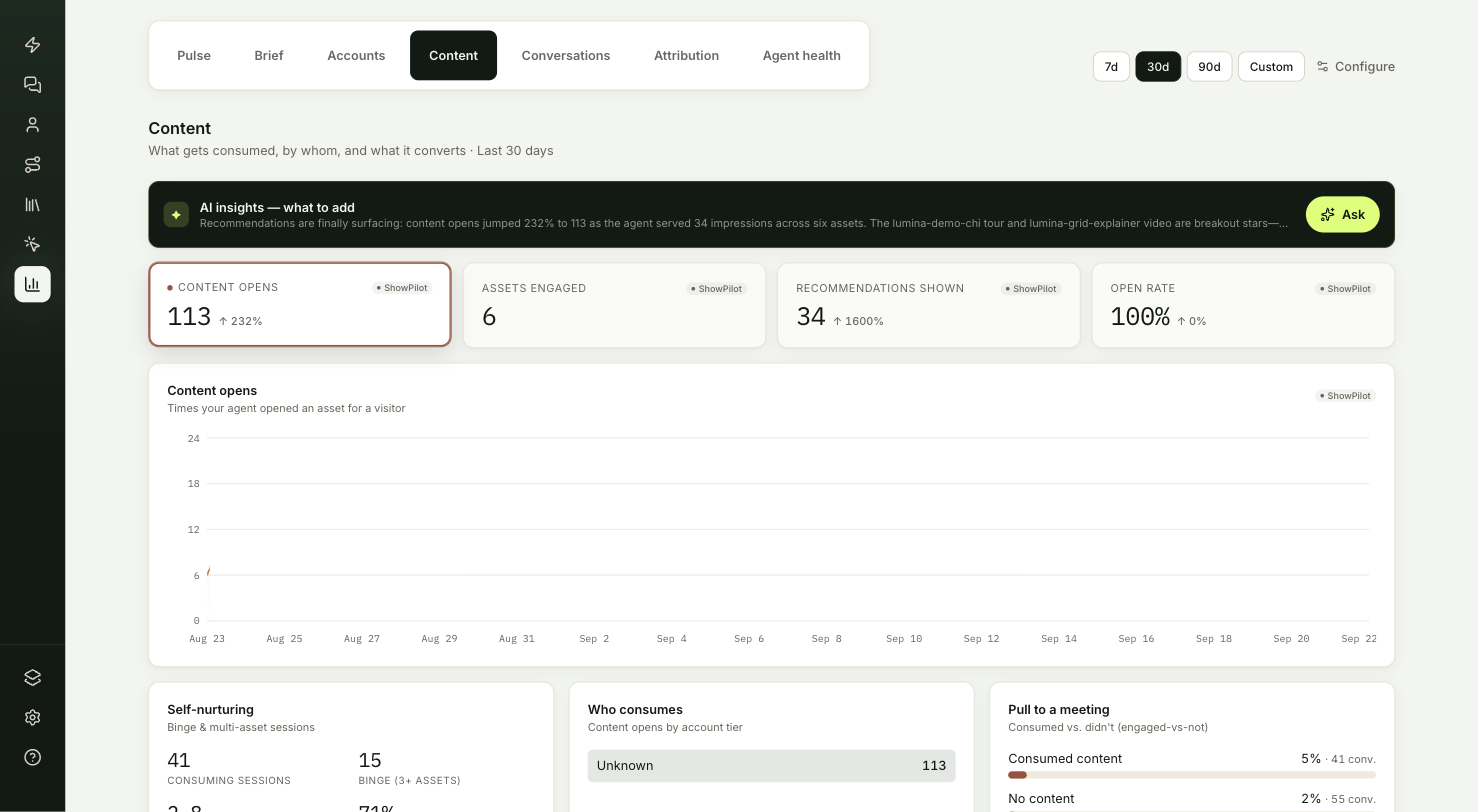
What does the Content tab show?
| Card | What it tells you |
|---|---|
| Summary band | One content move to make next. |
| KPI cards | How often assets were recommended and opened. |
| Self-nurturing, Who consumes, Pull to a meeting | How visitors consume content, and whether it goes with meetings. |
| Content performance | How each asset performs. |
| Pages that start conversations | Where on your site conversations begin. |
| Content by format | Opens split by format. |
What does the summary band suggest?
The summary band on this tab ends with one content move: add an asset for a gap, promote one that's working, or retire one nobody opens.
What do the KPI cards count?
| Card | What it counts |
|---|---|
| Content opens | Times an asset was opened for a visitor. |
| Assets engaged | Distinct assets opened at least once in the range. |
| Recommendations shown | Content cards your agent put in front of visitors. |
| Open rate | Content opens divided by recommendations shown. |
How do visitors consume content?
The Self-nurturing, Who consumes and Pull to a meeting cards appear once at least one conversation in the range opened content.
- Self-nurturing shows Consuming sessions (conversations that opened at least one asset), Binge (3+ assets), Avg assets / session and Multi-asset, the share of consuming sessions that opened two or more.
- Who consumes splits content opens by the tier of the visitor's account: Target (ICP), Customer, Churned or Unknown.
- Pull to a meeting compares the meeting rate of conversations that opened content with conversations that didn't. This shows that the two go together. It doesn't prove the content caused the meeting.
How do you judge each asset?
Content performance has one row per asset, sorted by opens. The tabs above the table filter by format and show a count for each. Once there are more than six assets, a search box appears.
| Column | What it shows |
|---|---|
| Content | The asset, with its thumbnail when your library has one. |
| Agents | The agents that opened it for visitors. |
| Recommended | Times it was shown, with the change against the previous period. |
| Opened | Times it was opened. |
| Open rate | Opened divided by recommended. |
An asset shown 3 or more times and never opened gets a Retire flag. Replace it or take it out of your agent's recommendations.
Which pages start conversations?
Pages that start conversations lists the ten pages on your site where the most conversations began. Each page shows its conversation rate: sessions that became a conversation, divided by all agent sessions that started on that page.
Put your strongest content and offers on the pages at the top of this list.
What does Content by format show?
Content opens split by format, such as video, PDF or web page.
Troubleshooting
| Issue | What to check |
|---|---|
| The Self-nurturing cards are missing | They appear once at least one conversation in the range opened content. |
| No search box on Content performance | It appears once there are more than six assets. |
| An asset shows a Retire flag | It was shown 3 or more times and never opened. Replace it or take it out of your agent's recommendations. |
Frequently asked questions
Does Pull to a meeting prove content caused meetings?
No. It shows that opening content and booking meetings go together. It doesn't prove the content caused the meeting.
How is open rate worked out?
Content opens divided by recommendations shown.