

What Insights shows
The reports behind Insights, where each number comes from, and how the date range works.
Insights is where you prove what your agents are worth. It reports the meetings and pipeline that followed from your agents' work with the visitors on your site, along with the qualified conversations that led there. It also shows who those visitors were and what they asked. Tour performance has its own report under Tours → Insights.
This article covers what each tab tells you, where the numbers come from, and how the date range works.
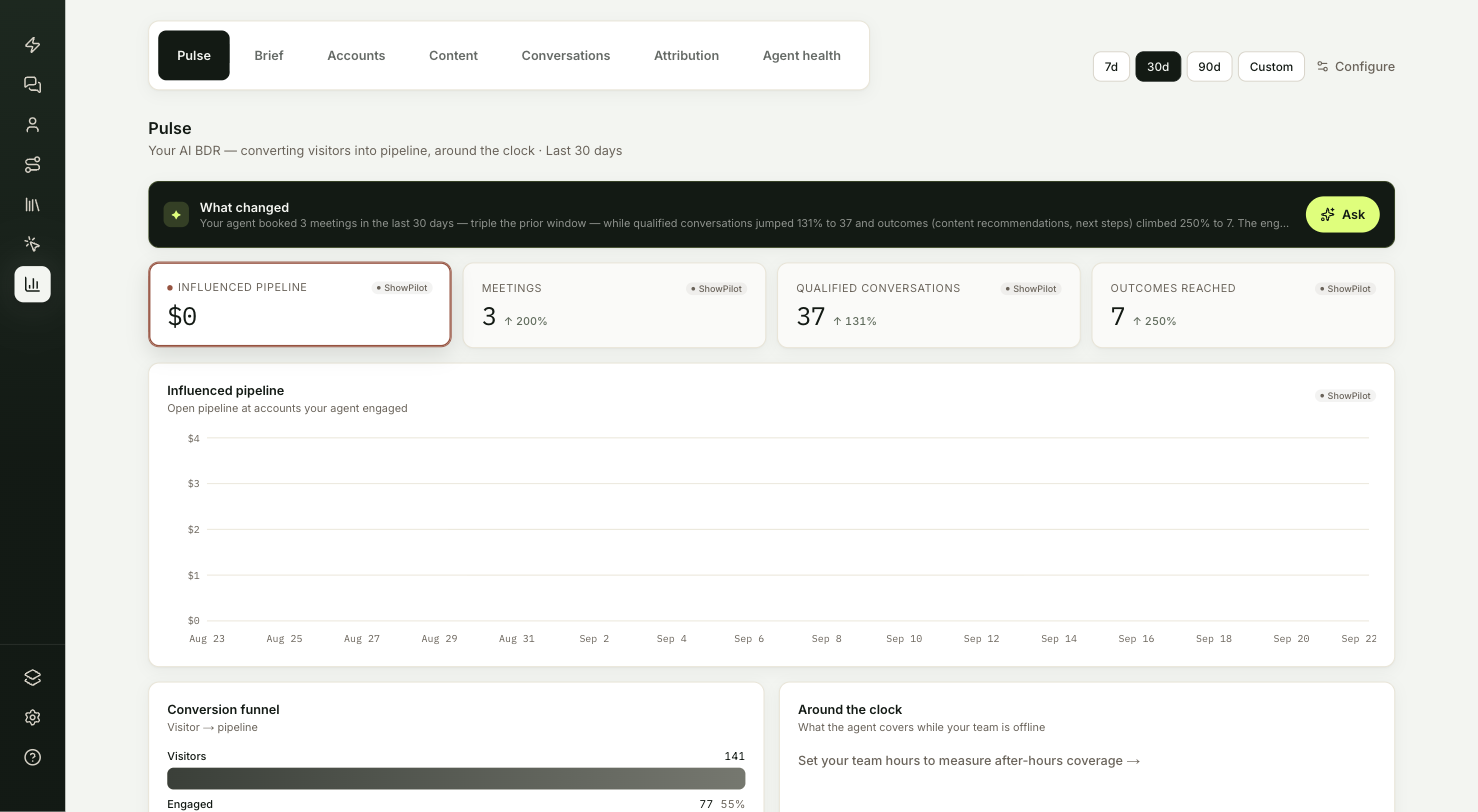
Where do you find Insights?
Open it from Insights in the sidebar. You're in the right place when you want to know whether your agents are producing meetings and pipeline, or which accounts your team should call next.
What does each tab tell you?
| Tab | What it tells you |
|---|---|
| Pulse | Whether the agent is producing meetings and pipeline, and which accounts to call today. |
| Brief | A weekly write-up of your agents' work, with recommended next moves. |
| Accounts | Every company that engaged, ranked by intent. |
| Content | What your agent recommended, what got opened, and which pages start conversations. |
| Conversations | Volume, chat versus voice, what buyers ask, and live handoffs. |
| Attribution | How the accounts your agent touched moved through your CRM funnel. |
| Agent health | Reliability, answer rate and response time. |
Pulse
Headline numbers, the conversion funnel and the accounts to call today.
Brief
A weekly write-up of your agents' work, with recommended next moves.
Accounts
Every company that engaged, ranked by intent.
Content
What your agent recommended, what got opened, and which pages start conversations.
Conversations
Volume, chat versus voice, what buyers ask, and live handoffs.
Attribution
How the accounts your agent touched moved through your CRM funnel.
Agent health
Reliability, answer rate and response time.
Tour analytics
Plays, completion and known viewers for every tour.
Where do the numbers come from?
ShowPilot measures everything on these tabs itself. You don't need to connect an analytics tool.
- Conversations and visits. Your agent records every conversation and every page view on sites where the web tag runs.
- Events inside conversations. Live calls, calendar bookings, form submissions and content opens are recorded as they happen.
- Your CRM. Pipeline amounts, deal stages and lifecycle stages come from your connected CRM. Without one, the pipeline numbers stay at $0.
A conversation only counts once the visitor or the agent has sent at least one message. Opening the widget and closing it again is not a conversation.
How does the date range work?
Every tab except Brief has the same range control in the top right: 7d, 30d, 90d or Custom. The default is the last 30 days.
- The range you pick stays in place as you move between Insights tabs, and the next time you come back.
- Days run midnight to midnight, UTC.
- The small percentage on a KPI card compares the current range with the period of the same length just before it. It's blank when that earlier period had nothing to compare against.
Brief always covers the last 7 days.
How do the AI summaries and the Ask box work?
Most tabs open with a dark band that summarizes the numbers below it in a few sentences. The summary is written from the same data the tab shows, and it's rewritten when that data changes.
Select Ask on the band to ask a question about performance, such as "Which accounts are warming up?". The answer uses your org's numbers for the date range you're viewing.
What is left out of Insights?
- Your own team's traffic. Visits and conversations from addresses you list in Settings → Insights are marked internal and left out. See Exclude your team's traffic.
- Your own tour plays. Plays you start from inside ShowPilot never count toward tour numbers.
For how each number is counted, see the metrics glossary.
Troubleshooting
| Issue | What to check |
|---|---|
| Pipeline numbers show $0 | Pipeline comes from your CRM. Without a connected CRM, the pipeline numbers stay at $0. |
| A number looks lower than expected | Check the date range, and that days run midnight to midnight, UTC. Traffic from excluded addresses is left out. |
| The change percentage is blank | The earlier period of the same length had nothing to compare against. |
| The Brief doesn't match the range you picked | Brief always covers the last 7 days, whatever range the other tabs use. |
Frequently asked questions
Do I need to connect an analytics tool?
No. ShowPilot measures everything on the Insights tabs itself. A connected CRM is only needed for pipeline amounts and deal stages.
Does opening the widget count as a conversation?
No. A conversation only counts once the visitor or the agent has sent at least one message.
Where do I see how tours perform?
Under Tours → Insights. See Tour analytics.