

Hub settings
Turn a hub link on or off, choose whether it plays self-guided or agent-led, and decide which agents can present its tours.
The same set of tours can be a quiet self-guided walkthrough or a live presentation by your agent. A hub's settings decide which one a viewer gets from the hub link, and whether the link serves at all, so you can switch a whole account's experience without touching a single tour.
You're in the right place when you want to pause a hub link, make a hub agent-led, or control which of your agents may present its tours.
Where are a hub's settings?
Open the hub from Tours → Hubs and select the Settings tab. Changes save on their own a moment after you make them, and the card shows Saving… while they do. They reach viewers within a minute; there's nothing to publish.
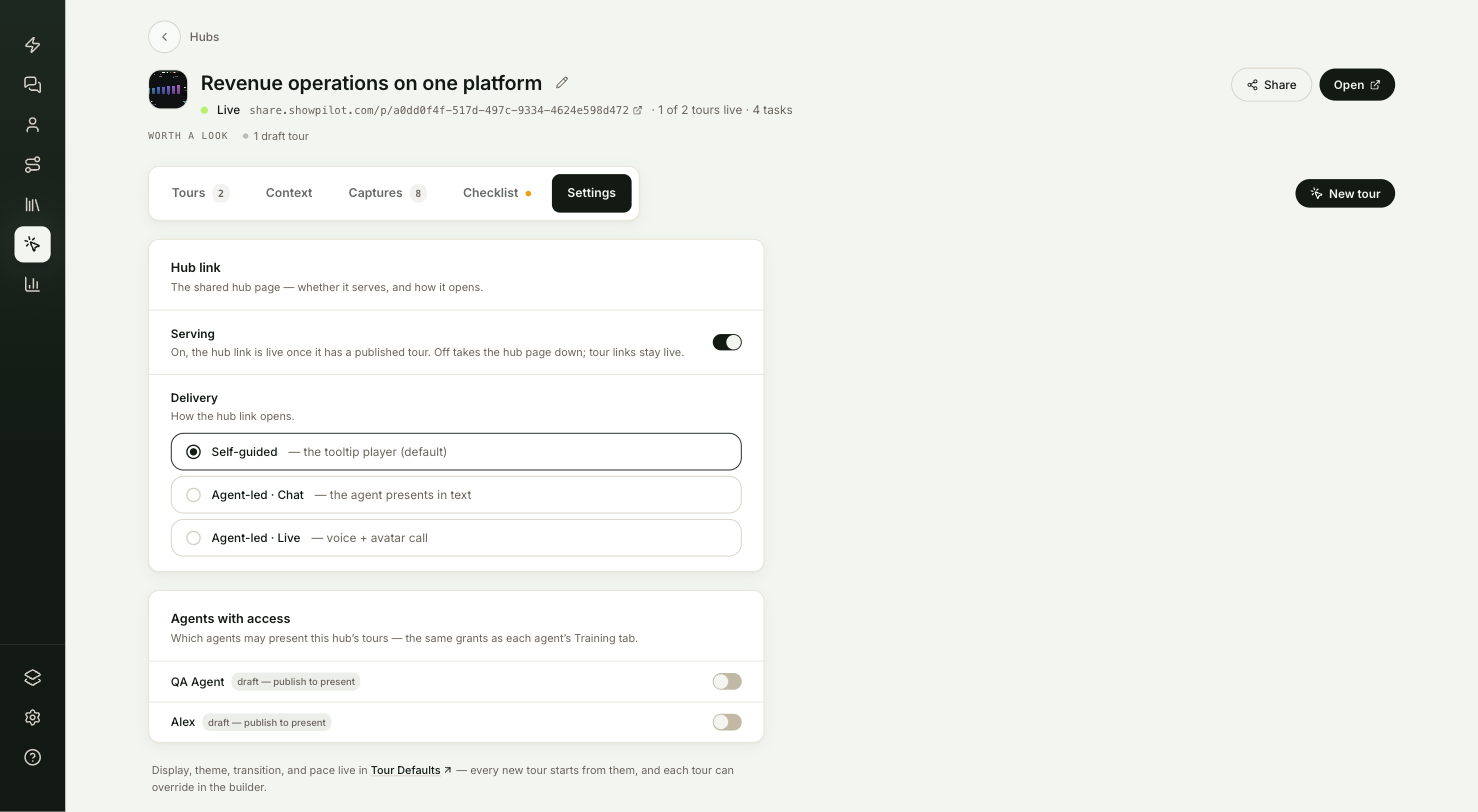
| Setting | What it does |
|---|---|
| Serving | Under Hub link. On by default. Off takes the hub page down; the tours' own links stay live. |
| Delivery | Under Hub link. How the hub link opens: Self-guided, Agent-led · Chat or Agent-led · Live. |
| Presenter | Under Delivery, shown when delivery is agent-led. Which published agent presents the hub link. Workspace default names the agent ShowPilot would pick on its own: the oldest published agent. |
| Agents with access | One switch per agent in your workspace. Decides which agents may suggest, open and present this hub's tours. |
| Tour Defaults link | Display, theme, transition and pace are set per workspace in Tour Defaults, and per tour in the builder. See Tour settings. |
What does Serving do?
Serving is the hub link's on/off switch. While it's on, the hub link is live as soon as the hub has a published tour. Turn it off to take the hub page down, for example when an evaluation ends. Anyone who opens the link then sees a page saying the tour wasn't found.
Turning it off doesn't touch the tours. Each tour keeps its own link and embeds, and keeps playing wherever you've shared it. To stop a single tour, turn off Serving in that tour's Settings in the builder.
While serving is off, the hub header says Serving off, and the status line reads "Serving is off in Settings — this link is paused; tour links stay live."
How does Delivery work?
Delivery sets how the hub link opens for every viewer.
The default. Viewers click through the tours themselves in the tour player, with your guide cards, the checklist if you built one, and the tour chooser when there are several live tours and no checklist.
Each tour in the hub follows the hub's Delivery unless the tour sets its own. In the builder's Settings, How the tour link opens is Same as the hub by default. Set it to something else to make one tour different, for example self-guided in an agent-led hub.
Agent-led delivery needs a published agent in your workspace. Presenter picks which one presents this hub's link. Leave it on Workspace default and the oldest published agent presents; the option names that agent. Pick another published agent to pin it for this hub. If the pinned agent is later unpublished, the link falls back to the workspace default and the picker marks the pin draft, publish to present. With no published agent at all, the hub link plays self-guided. See Agent-led tours.
How do Agents with access work?
Agents with access lists every agent in your workspace, each with a switch. Switch an agent on to let it suggest, open and present this hub's tours in its conversations, such as with a visitor on your website. Nothing is switched on by default, because a hub can hold private notes about an account that shouldn't reach a site-wide agent.
A grant covers every tour the hub publishes, including tours you publish later. If you stop serving a tour, the agent stops offering it.
Draft agents show draft — publish to present. You can switch them on now, but they can't present until you publish them. See Preview and publish.
The same grants appear on each agent's page, in the Tours card on the Persona tab. Switching a hub on in either place switches it on in both. See The agent editor.
These switches don't choose who presents the hub link: that is the Presenter under Delivery, or the workspace default (the oldest published agent) when none is pinned. If Delivery is agent-led and no agent in the workspace is published, the readiness strip shows Agent-led is on but no published agent can present this hub — publish an agent.
How do you make a hub agent-led?
Publish an agent
Agent-led delivery needs at least one published agent in your workspace. If you don't have one, see Create an agent.
Give it access
On the hub's Settings tab, under Agents with access, switch on the agents that may present this hub's tours.
Choose the delivery
Under Delivery, choose Agent-led · Chat or Agent-led · Live. The hub link, and every tour in the hub that follows the hub's setting, now opens agent-led.
Set the pace (optional)
Pace isn't a hub setting. Set it for the whole workspace in Settings → Tour Defaults, or for one tour under Pace (agent-led) in the builder's Settings. See Tour settings.
Test it
Your hub settings are working when:
- The hub header shows Live, or Serving off if you turned serving off on purpose.
- You open the hub link in a private browser window and it opens the way you set under Delivery: the tour player, the chat layout, or the Join the tour cover.
- With Serving off, the hub link shows a not-found page, and a tour's own link from the same hub still plays.
- The readiness strip doesn't show Agent-led is on but no published agent can present this hub.
Troubleshooting
| Issue | What to check |
|---|---|
| The hub link plays self-guided although Delivery is agent-led | You need at least one published agent in the workspace. Draft agents can't present. |
| One tour opens differently from the rest of the hub | That tour sets its own How the tour link opens in the builder's Settings. Set it back to Same as the hub. |
| The readiness strip says no published agent can present this hub | Publish an agent in Agents. Agents with access doesn't choose the presenter. |
| An agent is switched on but tagged draft — publish to present | Publish the agent. |
| The hub link shows a not-found page | Serving is off, or no tour in the hub is published. |
| Live viewers can't talk to the agent | They need to allow microphone access when their browser asks. They can still type. |
FAQ
Does turning off Serving on a hub unpublish its tours?
No. The tours stay published, and their own links and embeds keep working.
Can one tour in an agent-led hub stay self-guided?
Yes. Open the tour in the builder, select Settings, and set How the tour link opens to Self-guided. The tour's setting wins over the hub's.
Why are display and theme settings not here?
They moved to Settings → Tour Defaults, which sets them for every new tour in your workspace. Each tour can change them in the builder.
Do I need to grant access again when I add a tour to the hub?
No. A hub grant covers every tour the hub publishes, including new ones.
Can I test agent-led delivery without changing the setting?
Yes. Add ?present=chat or ?present=live to the end of the hub link. See Share links.
Related articles
Checklists
Build the panel that guides viewers through a hub's tours in order, tracks their progress, and ends with your call to action.
Publish a tour and manage revisions
Publish a tour so viewers can see it, push later edits with Update, roll back to an earlier revision, and take a tour down with Serving.