

Agent-led tours
Let your ShowPilot agent present a tour in chat or on a live call, answering questions as it goes, and choose where each tour opens that way.
Most buyers who open a tour want someone to walk them through it, and there's rarely a rep free at that moment. An agent-led tour gives every viewer that walkthrough: your ShowPilot agent moves the tour from screen to screen, explains what matters on each one, answers questions along the way, and asks for the meeting at the end. The same tour still plays self-guided anywhere you haven't turned this on.
You're in the right place when you want your agent to present a tour or hub, or when an agent-led link isn't behaving the way you expect.
What are the delivery modes?
Every tour and hub link opens in one of three ways.
The default. Viewers click through the tour themselves in the tour player: your guide cards, buttons and links, the screen pill and arrow keys, and the tour's voiceover if it has one. On a hub link they also get the checklist or the tour chooser.
The agent's voice and avatar come from the agent's settings. See Voice and video avatar.
Where do you set the delivery?
| Where | Setting | What it controls |
|---|---|---|
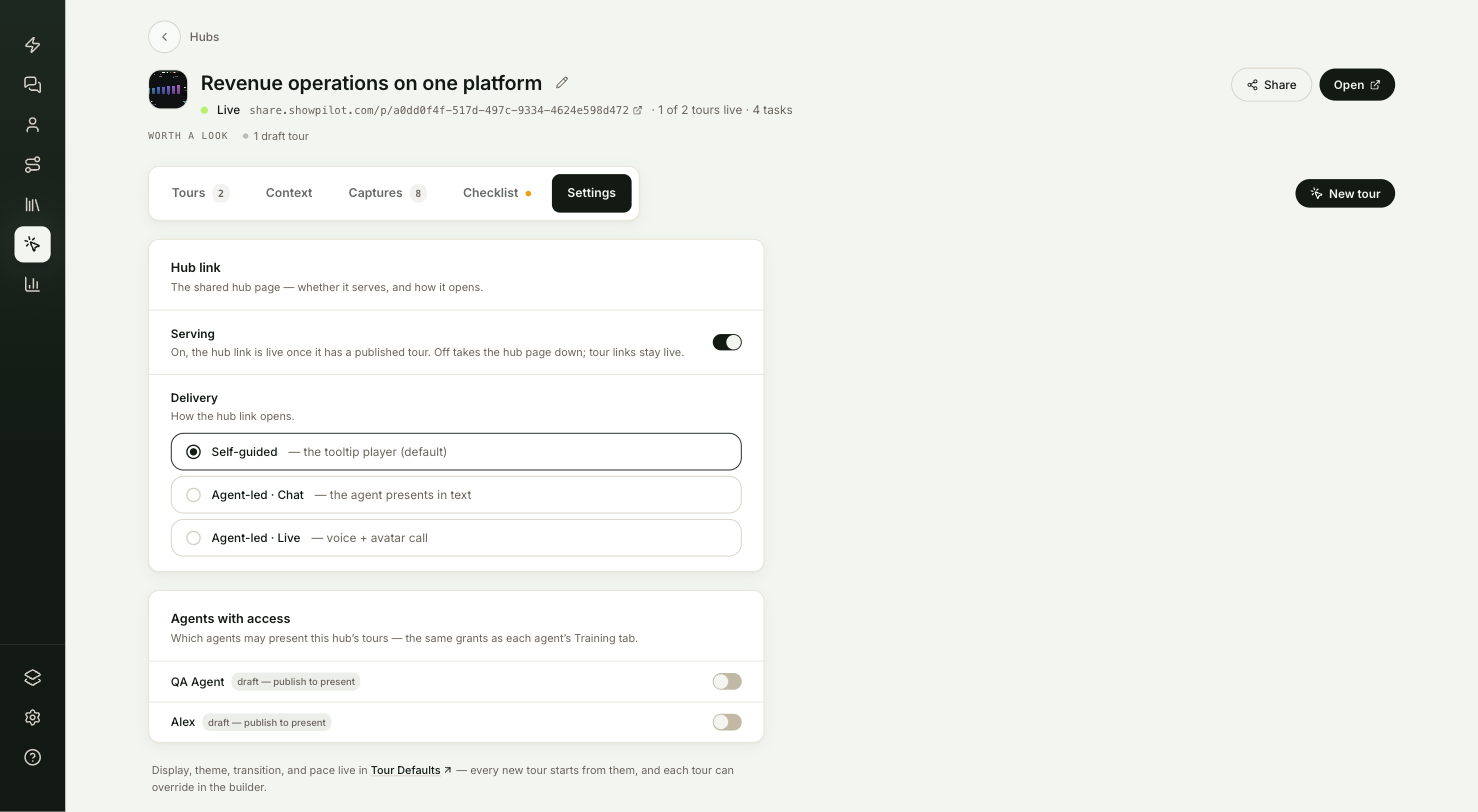
| A hub's Settings tab | Delivery: Self-guided, Agent-led · Chat or Agent-led · Live | The hub link, and every tour in the hub that follows the hub. See Hub settings. |
| The builder's Settings panel, Delivery card | How the tour link opens | One tour's own link. Same as the hub is the default for a tour in a hub. Choose another option to override the hub for this tour. Select Update to save. |
| The end of a link | ?present=chat, ?present=live or ?present=self | That one link, whatever the settings say. Useful for testing, or for sending one account a different version. See Share links. |
A tour that sets its own delivery always wins over its hub, including a tour set to Self-guided in an agent-led hub.
What does agent-led delivery need?
- The tour must be in a hub. Every tour you create from captures already is. A tour's hub supplies the context the agent presents with.
- Your workspace needs a published agent. Hub and tour links are presented by the first agent you created that's published. Draft agents can't present. See Preview and publish.
- The tour must be published and serving. See Publish and revisions.
If any of these is missing, the link doesn't break: it plays the self-guided tour instead.
What do Agents with access do?
Agents with access, on the hub's Settings tab or the Tours card on an agent's Persona tab, decides which agents can bring a hub's tours into their own conversations. An agent with access can suggest a tour to a visitor on your website, open it, and present it in that conversation. Nothing is switched on by default.
A hub grant covers every tour the hub publishes, including tours you publish later. Access is separate from presenting: the hub link is presented by the agent picked under Presenter on the hub's Settings tab, or else your workspace's oldest published agent, whether or not it has access here. If agent-led delivery is on and no agent in the workspace is published, the readiness strip shows Agent-led is on but no published agent can present this hub — publish an agent.
How do you set up an agent-led tour?
Publish an agent
Make sure at least one agent in your workspace is published. See Create an agent.
Give your agent access to the hub
Open the hub from Tours → Hubs, go to its Settings tab, and under Agents with access switch on the agents that may present its tours. You can do the same from the agent's side, in the Tours card on its Persona tab.
Turn on agent-led delivery
On the hub's Settings tab, under Delivery, choose Agent-led · Chat or Agent-led · Live.
To change a single tour, open it in the builder, select Settings, and under Delivery set How the tour link opens. Select Update.
Set the pace
Pace decides how the agent carries the story.
| Pace | How the agent presents |
|---|---|
| Brisk | Lands each point and keeps moving. The default. |
| Relaxed | Gives each screen room to breathe, and moves on when the viewer signals they're ready. |
Set the default for every new tour in Settings → Tour Defaults, or change it for one tour under Pace (agent-led) in the builder's Settings. Pace has no effect on self-guided plays. See Tour settings.
Give the agent something to say
The agent presents from what it knows: the description of each screen, the text visible on it, the hub's context, and your workspace context. The better those are, the better it presents. See Screen context and Tour context.
How does the agent present?
When the agent presents, the tour player changes how it behaves:
- No guide cards. Guide and Link steps don't show their cards. A highlight ring glides to each step's element instead, and the agent's words carry the step. Lightbox steps still show, since they fill the screen.
- The agent moves the stage. It advances the tour itself. In chat, it decides after each step whether to move on or stay on a screen.
- A cursor shows clicks. Where a tour has a click action, a cursor glides to the element and clicks it, so viewers see the product being used.
- One voice. The tour's own voiceover stays silent. The agent is the narrator.
- The agent can quote the screen. It reads the text visible on the current screen, so it can point at a specific number or label.
- Viewers can take over. If a viewer clicks through the tour themselves, the agent follows where they went.
- Questions come first. In a live call, speaking interrupts the agent, which pauses the walk to answer.
- It closes the loop. When the tour reaches its end, or a step marked Completion step, the agent lands the story and asks for your call to action or a meeting.
Where do viewers meet the agent?
| Place | What happens |
|---|---|
| The tour or hub link | Anyone who opens it gets the delivery you set, or the one in the link's ?present= option. |
| An inline embed | For an agent-led tour or hub, the Inline code from the share window puts the agent and the tour together inside the frame, with microphone permission for live calls. See Embed a tour. |
| Your website | An agent with access to a tour can suggest it, open it and present it in a conversation with a visitor on your site. |
Two ways of showing a tour or a hub always play self-guided: the Launch button embed, and any link that ends in ?embed=1, hub links included.
Test it
Your agent-led tour is ready when:
- The hub's readiness strip doesn't list Agent-led is on but no published agent can present this hub.
- You open the hub or tour link in a private browser window, and the chat layout or the Join the tour cover appears.
- The agent starts presenting, and the highlight ring moves as it talks.
- You ask a question about the screen it's on, and it answers before carrying on.
- At the end, it asks for the meeting or your call to action.
Troubleshooting
| Issue | What to check |
|---|---|
| The link plays self-guided | Check the tour is in a hub, Delivery is agent-led on the hub or the tour, and your workspace has a published agent. |
| One tour plays self-guided in an agent-led hub | That tour sets its own How the tour link opens. Set it to Same as the hub and select Update. |
| The readiness strip says no published agent can present this hub | Publish an agent in Agents. The hub link is presented by its pinned agent, or else the oldest published agent in your workspace. |
| A different agent presents than the one I expected | Hub and tour links are presented by the first agent you created that's published. |
| The agent says something wrong about a screen | Correct that screen's context. See Screen context. |
| The agent talks about the wrong audience or product area | Fill in the hub's Context tab. See Tour context. |
| Live viewers can't talk to the agent | They need to allow microphone access. In an embed, check the frame's allow list includes microphone. |
| The embed plays self-guided | Use the Inline code, copied after you turned on agent-led delivery. The Launch button is always self-guided. |
| The agent rushes or lingers | Change Pace to Relaxed or Brisk. |
FAQ
Do new tours in a hub need their own agent access?
No. A hub grant covers every tour the hub publishes, including ones you publish later.
Can a draft agent present a tour?
No. You can give a draft agent access, but it can't present until it's published.
Can one tour in an agent-led hub stay self-guided?
Yes. Open the tour in the builder, select Settings, and under Delivery set How the tour link opens to Self-guided. The tour's setting overrides the hub's.
Can I try agent-led delivery without changing any settings?
Yes. Add ?present=chat or ?present=live to the end of the tour or hub link. The tour still needs to be in a hub, with a published agent in your workspace.
Does the launch button embed open the agent-led version?
No. The launch button always opens the self-guided tour. Use the inline embed to show the agent presenting.